Lovable GitHub Integration: The Founder Handoff Checklist
Use Lovable's GitHub integration as a production handoff gate: branch discipline, Supabase security, payments, hosting, QA, and ownership.

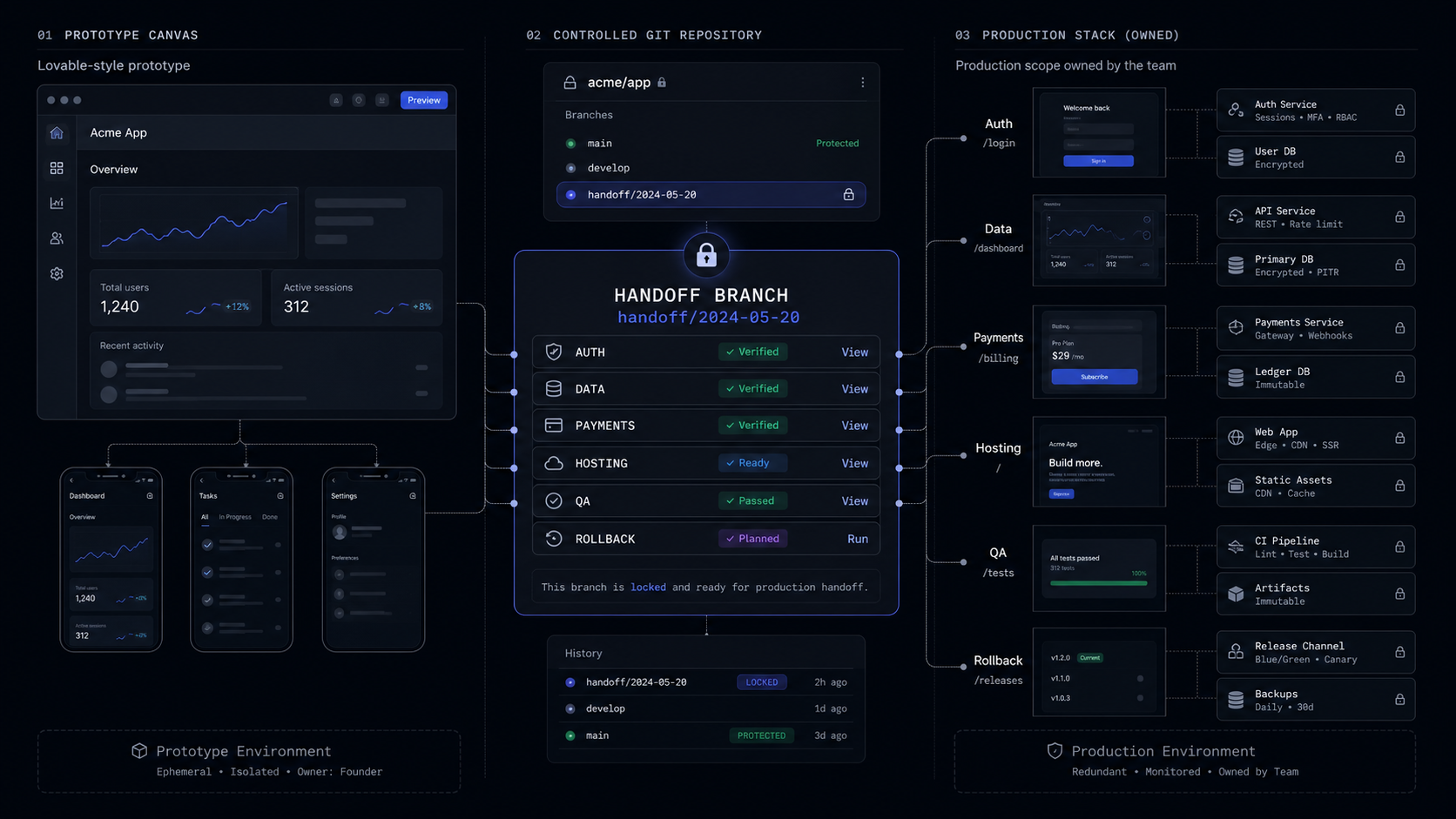
Lovable's GitHub integration is useful when you treat it as a handoff point, not a production guarantee. Connect the repo, freeze the core workflow, audit auth, data, payments, and deployment, then decide what stays in Lovable and what moves into an owned build plan.
The Handoff Verdict
Use Lovable's GitHub integration once the prototype has proved the workflow, then stop treating prompts as the control system. The repo gives you ownership, collaboration, review, and deployment options. It does not automatically give you production architecture, security policy, test coverage, release discipline, or a clean founder handoff.
That distinction matters because a Lovable prototype can look finished before the business risk is finished. A buyer dashboard with login, a few tables, a payment button, and a polished UI can still be missing the parts a funded founder needs before launch: who can access which rows, where secrets live, what happens when Stripe fails, how to roll back a release, and which system is the source of truth.
The right move is not to discard Lovable. It is to put a gate around it. Keep using Lovable for fast iteration while the product question is still open. Once one core workflow is clear, connect GitHub, move the code into a controlled repo, and run a production-readiness pass before adding more surface area.
This is the same boundary behind a vibe-coded MVP handoff: the demo proves what the product should do, then the owned build makes it survivable.
What The GitHub Integration Actually Gives You
Lovable's GitHub integration gives you a real collaboration path, but it is still one connected project and one active branch at a time. The integration has two parts: a workspace connection that authorizes Lovable through the Lovable GitHub app, and a project repository link that connects one Lovable project to one GitHub repository.
Once connected, changes made in Lovable sync to GitHub, and changes pushed to the active GitHub branch sync back into Lovable. That is the useful bit for a founder: the prototype is no longer trapped in a visual builder. Developers can clone the repo, review commits, open pull requests, create branches, work locally in an IDE, and deploy outside Lovable.

The limitation is just as important. Lovable only edits and syncs one branch at a time. A new branch is created from the currently active branch, not automatically from main. If the prototype is on a messy branch and you create production-handoff, that branch inherits the mess.
Here is the founder-grade read:
The integration is strongest when you make it part of a scoped release process. It is weaker when founders use it as a comfort blanket: "we have GitHub, so we own it." You own the code when the repo can be built, reviewed, deployed, monitored, and handed to another engineer without Lovable chat as the missing context.
The First Repo Decision: Branch, Freeze, Review
Start the handoff by freezing one branch around one core workflow. Do not connect GitHub and keep prompting across pricing, onboarding, admin, email, reporting, and billing at the same time. That creates a moving target for reviewers and hides the real production risks.
For a funded founder, the branch should answer one question: "Is this the version we want to harden?" If yes, name it plainly, keep it stable, and move changes through review instead of live prompting.
1. Connect from the right workspace
Use a GitHub organization controlled by the company, not a personal account that will become a transfer problem later. Lovable lets workspace owners or admins install and manage workspace GitHub connections. Project owners or admins can connect and disconnect the project repository.
2. Create the repository once
Connecting a Lovable project creates a new GitHub repository and starts two-way sync automatically. Do not rename, move, or delete the repository after connection, because Lovable warns that doing so breaks sync.
3. Switch to the source branch before creating the handoff branch
Lovable creates new branches from the currently active branch. If the handoff branch should start from
main, switch tomainfirst, then create the new branch. You cannot switch or create branches while Lovable is editing the project.4. Clone and build locally
Clone the repository and run the documented project setup. Lovable applications are standard Vite + React projects, so the first review is not exotic. Check dependencies, environment variables, build scripts, routing, auth flows, generated SQL, and any edge functions before touching new features.
5. Turn the review into a scope log
Write down what ships, what gets rewritten, what waits, and what remains in Lovable. That log matters more than a polished demo because it becomes the fixed scope for production work.
The key is to make Lovable a source of product evidence, not the place where every production decision lives. The repo handoff should produce a controlled backlog: auth review, database policies, payments, deployment, QA, analytics, launch-site copy, and handover documentation.
The Production Handoff Checklist
A Lovable-to-GitHub handoff is ready when the riskiest parts are explicit. The checklist below is deliberately narrower than a full engineering audit. It is the pass a founder needs before deciding whether to keep iterating in Lovable, hire a developer, or scope a fixed production sprint.
Auth And Permissions
Auth is ready when users can only see and change what they should. Lovable's Supabase integration can create authentication flows, connect a PostgreSQL database, generate tables, and wire UI to data. That is a strong prototype path, but production depends on policy review.
Supabase's default security posture is permissive for development, and Lovable's own docs say Row Level Security policies should be set before going live. Row Level Security is the database rule layer that controls which rows each user can read or write. A real handoff checks it with actual users:
- A regular user cannot read another user's records.
- An admin can see only the admin routes and data they should manage.
- Logged-out users cannot call protected APIs.
- Test accounts cover every role, not just the happy path.
For a SaaS MVP, this is usually the first place to slow down. A beautiful account page is cheap. Correct tenant isolation is not.
Database And Data Ownership
Data is production ready when the tables match the workflow and the migration path is clear. Lovable says users own their data, and its hosting docs describe portable database, storage, and configuration. The practical test is whether another engineer can inspect the schema, understand which tables matter, and migrate or back up the project without guessing.
Lovable's Supabase integration can propose SQL for new tables, but the user still runs the SQL in Supabase's SQL Editor and confirms before the app binding is finalized. That is a useful moment to review the model. If the product is an AI onboarding tool, the core tables might be accounts, users, projects, onboarding_answers, and generated_outputs. If the prototype generated feedback, feedback2, and new_feedback_final, fix that before launch.
Secrets And Payments
Secrets are ready when no private key lives in client-side code or screenshots. Lovable can store required secret keys in Supabase Edge Function secret manager, encrypted and on the backend. For payments, Lovable can scaffold Stripe payment processing through Supabase Edge Functions, using the Stripe secret key from that secret store.
That still needs a manual payment review. A production pass should check:
- Stripe secret keys are stored only in backend secret management.
- Webhook handling exists for payment success, failure, cancellation, and refund states.
- Paid access is driven by server-side entitlement state, not by a UI flag.
- Test mode and live mode are separated.
- The product has a manual support path when payment state and app state disagree.
Stripe Standard charges 2.9% + 30c per successful domestic card transaction and has no setup or monthly fees. That is simple enough for a first MVP, but payment logic is never a place to rely only on generated code.
Hosting, Environments, And Rollback
Hosting is ready when the production owner can deploy, inspect, and roll back without asking Lovable to explain the app. Lovable Cloud can host production with custom domains, automatic SSL, global delivery, automatic deployments, environment management, managed backend, databases, infrastructure, authentication, and data isolation. That is a valid default while the app is still small.
The moment you need custom infrastructure, external deployment, or a buyer due-diligence trail, GitHub becomes the bridge. Lovable applications are standard Vite + React projects and can run on major cloud providers, managed hosting platforms, or self-hosted infrastructure. The frontend can move while the backend stays on Lovable Cloud. Moving the backend is cleaner when it moves to managed Supabase or self-hosted Supabase, because plain PostgreSQL or another database provider requires equivalent auth, storage, realtime, and edge services.
If you choose Vercel for the frontend, Pro is $20 per month and includes $20 of usage credit, advanced spend management, team collaboration, and free viewer seats. Hobby is for personal, non-commercial use. For a funded product, the practical rule is simple: do not launch a commercial MVP on personal hobby infrastructure.
Staging And QA
QA is ready when a risky change can be tested without touching live users. Lovable currently connects each Lovable project to one Supabase project and does not have a built-in staging mode. Supabase Branching can create a temporary copy of the database for tests, but the handoff still needs an explicit environment plan.
For a first launch, keep it boring:
- One production environment.
- One preview or staging environment if user data or payments are involved.
- One seed data set for testing the core workflow.
- One rollback path for the frontend.
- One list of manual acceptance tests for the workflow that makes the product valuable.
If the MVP cannot pass that list, keep it in prototype mode.
The Budget You Should Expect
The first production month is not just the Lovable bill. It is the combined cost of the builder, backend, hosting, payments, and whatever expert review turns the prototype into a product.

The hidden cost is not the subscription stack. It is the rewrite created by launching before the scope is clean. If the Lovable prototype proves that buyers want the workflow, the next spend should usually be a scoped hardening pass, not another week of broad prompting.
The AI app-builder comparison makes the same point from the tool-selection side: the best builder is the one that gets you to a useful artifact without pretending that production control disappeared.
When To Stop Prompting And Scope The Build
Stop prompting when the next feature hides the core risk instead of reducing it. A founder can always add another dashboard, role, import, export, notification, or AI action. That is how a clean prototype becomes expensive to harden.
The switch point is usually one of these:
- The app handles private user or company data.
- A payment, subscription, or entitlement gate affects access.
- More than one user role needs different permissions.
- A launch site is promising functionality that the app must reliably support.
- A buyer, investor, or partner will review the product.
- A developer needs to work from GitHub without Lovable chat as the missing documentation.
At that point, the right deliverable is a scoped build plan. It should name the core workflow, the excluded features, the production stack, the auth and data rules, the payment states, the deployment path, the acceptance tests, and the handoff package.
For an AI SaaS MVP, that might mean:
- Keep the Lovable-generated onboarding UI if it is clean.
- Rewrite the entitlement and payment flow.
- Review every Supabase policy before inviting users.
- Move deployment to a company-controlled GitHub and hosting account.
- Cut the admin analytics panel until the first users create real events.
- Write a handoff README that explains setup, environment variables, test accounts, and release steps.
That is smaller than a rewrite and more serious than a demo. It gives the founder something they can sell, inspect, and improve without vendor panic.
The Founder Handoff Checklist
Use this checklist before turning a Lovable project into the live product:
Freeze one workflow
Name the single workflow the MVP exists to prove. Everything else is either launch support, later backlog, or deletion.
Connect GitHub under the company account
Install the Lovable GitHub app through the correct organization, connect the project once, and do not rename, move, or delete the generated repository.
Create a handoff branch from the right source
Switch to the branch you trust before creating the handoff branch, because Lovable creates new branches from the active branch.
Run a code and dependency review
Check the Vite + React project structure, package scripts, routes, auth flow, environment variables, generated SQL, edge functions, and any third-party SDKs.
Prove tenant and role boundaries
Use test users for each role and confirm that Row Level Security, route guards, and backend checks agree.
Separate secrets from UI code
Store API keys in backend secret management, not in the frontend. Confirm payment and AI-provider keys are never exposed to the browser.
Define the production owner
Decide whether Lovable Cloud, Vercel plus Supabase, or another stack owns production. Write down deploy, rollback, log, and support steps.
Scope the hardening sprint
Cut every feature that is not required for the core workflow. Price and schedule the work that protects auth, payments, data, deployment, QA, and handoff.
FAQ
Does Lovable automatically pull from GitHub?
Changes pushed to the active GitHub branch sync back into Lovable, and changes made in Lovable sync to GitHub. The important constraint is that Lovable edits and syncs one branch at a time, so the active branch must be chosen deliberately.
Can Lovable work with existing code?
Lovable's documented GitHub workflow lets developers clone, edit, commit, and keep a connected project synced. Treat any existing-code or imported-code work as a technical review, because the production question is whether the repo builds, deploys, secures data, and supports the core workflow.
How do you host a Lovable website from GitHub?
Use GitHub as the bridge to external deployment. Lovable says its apps are standard Vite + React projects that can run on managed hosting platforms or major cloud providers, but production still needs environment variables, build settings, domain setup, rollback, and logs.
Do you own your code in Lovable?
Lovable says projects can be continuously synced to GitHub, cloned, modified outside Lovable, deployed elsewhere, or self-hosted. Real ownership also includes data export, secrets, deployment access, documentation, and a repo another engineer can maintain.
Can I import a GitHub repo to Lovable?
Lovable's GitHub documentation centers on connecting a Lovable project to a repository and syncing the active branch. If the goal is to bring an existing production repo into an AI-builder workflow, review architecture and branch policy before connecting tools.
Book the Scoping Sprint
Turn your Lovable prototype into a fixed production scope with the workflow, stack, handoff, and launch risks made explicit before you build.
Jun 29, 2026