Google AI Studio Vibe Coding Review for MVPs
Use Google AI Studio vibe coding for a Gemini MVP demo, then scope production auth, data, cost controls, QA, deployment, and code ownership.

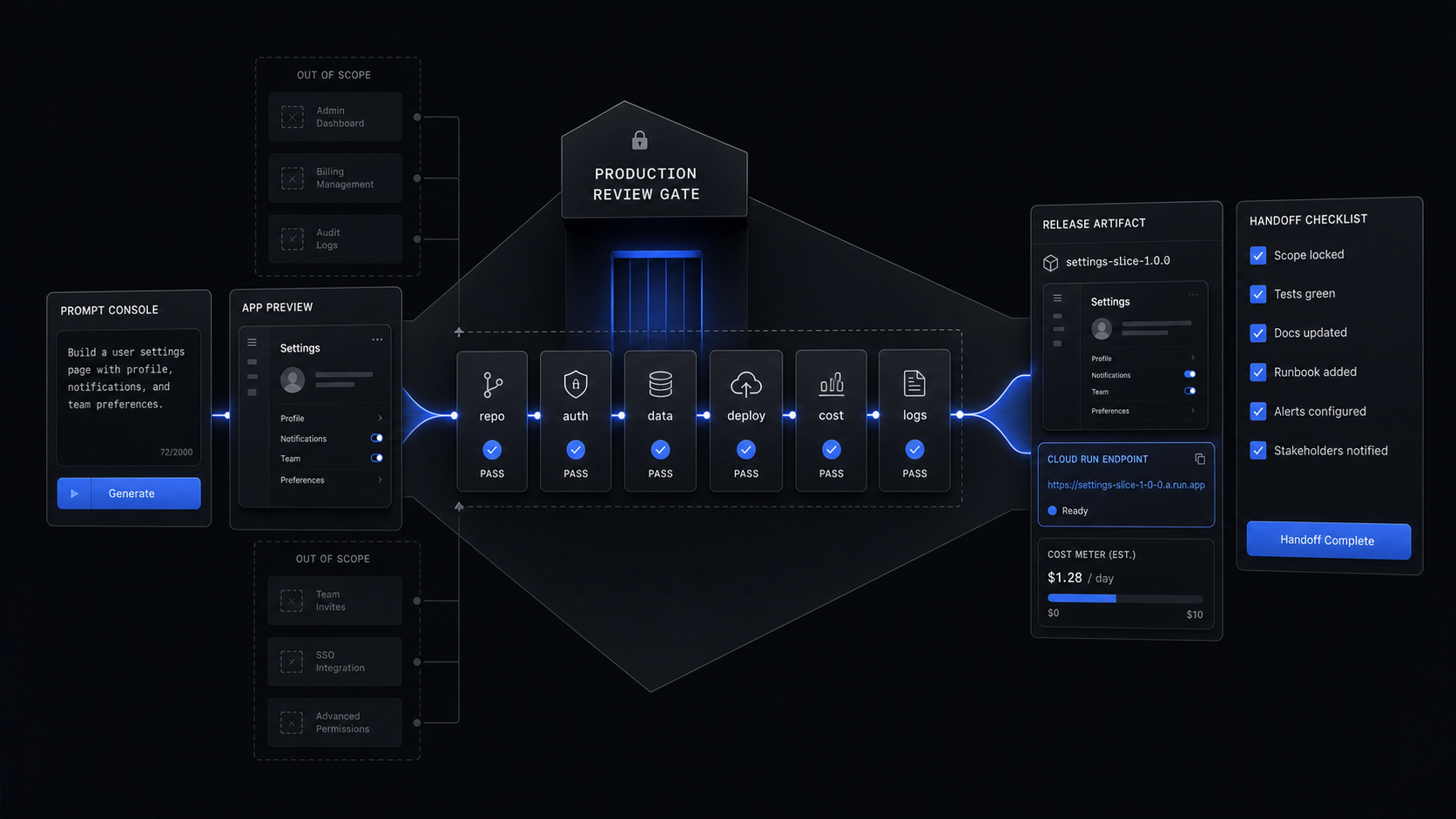
Use Google AI Studio vibe coding to prove a Gemini-native workflow, not to skip product scoping. It is strongest when the MVP depends on rapid interface generation, Gemini calls, and a quick Cloud Run demo; it still needs a production plan for auth rules, data ownership, billing, QA, observability, and code handoff.
The Verdict: Use It for Gemini Demos, Not Product Scope
Google AI Studio is worth using when the riskiest part of the MVP is the interaction model: can a user describe, generate, review, refine, and share an AI-powered result quickly enough to care? It is not the place to let scope sprawl into a full product just because the demo starts moving.
For a funded founder, the right use is narrow. Build one AI-native workflow, get a working interface in front of a small group of real users, save the code to GitHub, deploy a Cloud Run demo, and then make the hard production call. The hard call is whether to harden the generated app, rebuild the workflow inside your chosen stack, or keep the AI Studio version as a reference system.
Google AI Studio can help you move faster through a risky product question. It cannot decide which version-one workflow deserves engineering time. That is still scope.

What Google AI Studio Vibe Coding Actually Does
Google AI Studio now gives founders a real app-building path, not only a chat prompt. The current Google AI Studio vibe coding page says you can describe an app or website, drop in screenshots and docs, remix existing projects, share a link for feedback, and launch the project in one click. The same page says launched apps can be deployed on Google Cloud Run or saved to GitHub.
Google's March 18, 2026 announcement adds the production-adjacent pieces that matter for MVP buyers. AI Studio's upgraded experience uses the Google Antigravity coding agent and can build multiplayer experiences, add databases and authentication, install modern web tools, connect to outside services, remember work across sessions, and build with Next.js in addition to React and Angular. After you approve the Firebase integration, AI Studio can provision Cloud Firestore for databases and Firebase Authentication for sign-in with Google. It can also store API credentials in Secrets Manager in the Settings tab.
That is enough to make a serious demo. A founder testing an AI onboarding assistant, for example, can prompt the first interface, add a Google sign-in path, store feedback in Firestore, connect a Gemini call, push the code to GitHub, and deploy a Cloud Run link for a controlled pilot. That is a useful artifact because users can react to the workflow instead of a slide.
The boundary is just as important. A generated Firebase-backed demo is not automatically a durable SaaS MVP, an MVP is the smallest version that proves one core workflow with real users. Before you treat the demo as the product, inspect the database rules, auth states, API key handling, error states, usage logs, billing assumptions, and deployment ownership.
The Pricing and Privacy Line
AI Studio can be free to start, but production Gemini usage still needs a budget and data policy. Google's AI Studio page says AI Studio is a free tool for experimentation, prototyping, and building. The Gemini Developer API pricing page says developers can start free of charge with generous limits, then scale with prepaid and pay-as-you-go pricing.
The free-vs-paid line is not only about spend. Google's Gemini Developer API pricing page says the Free tier includes limited access to certain models, free input and output tokens, Google AI Studio access, and content used to improve Google products. The Paid tier is positioned for production applications that need higher volumes and advanced features, with higher rate limits, Context caching, Batch API with 50% cost reduction, access to Google's most advanced models, and content not used to improve Google products.
That makes the production decision straightforward. Use the free experience for exploration and throwaway prompts. Use a paid API posture when private customer data, proprietary product logic, or repeat production traffic enters the system.
Google's pricing page also gives a concrete model-cost example: Gemini 3.5 Flash Standard paid tier is listed at $1.50 input and $9.00 output per 1M tokens. On that same tier, Grounding with Google Search and Google Maps is listed as not available in the free tier, with 5,000 prompts per month free on paid, then $14 per 1,000 search queries. Do not copy those numbers blindly into your product plan unless you have fixed the model, tier, region, grounding use, and traffic shape. Use them to force the budget conversation early.

Price the first real usage band
Write the one workflow you will test, the expected monthly active users, the average prompts per user, whether each prompt uses grounding, and the model tier. Keep the estimate small but explicit.
Set the data rule
Decide which prompts are safe for free-tier exploration and which require paid API handling because they include private data, customer context, or proprietary logic.
Add a kill switch
Put usage limits in scope before launch: per-user prompt caps, daily spend alerts, fallback states, and a manual disable path for expensive features.
The MVP Workflow That Fits AI Studio
The best AI Studio MVP workflow is one thin vertical slice from prompt to user-visible output. Do not ask it to become the product roadmap. Ask it to answer one question with a working artifact.
Use this shape for a funded founder test:
- Pick one user and one job. Example: a customer-success manager turns a messy support transcript into a renewal-risk summary.
- Prompt the interface, not the company. The app needs a transcript input, a summary output, an editable risk score, and a save button. It does not need teams, billing, dashboards, exports, admin roles, or a CRM rewrite.
- Add persistent System Instructions. Google's AI Studio codelab says System Instructions persist throughout the session, which makes them the right place for coding standards, naming conventions, and a visual persona.
- Save to GitHub. The same codelab says AI Studio has built-in GitHub integration to create a repository, select public or private visibility, and push the code.
- Deploy to Cloud Run. The same codelab says Cloud Run deployment requires selecting a Cloud Project, verifying billing, clicking Deploy app, waiting a couple of minutes, and receiving an App URL.
- Test the workflow, not the architecture. Watch where users hesitate, what they edit, what they trust, and what they refuse to use.
This is where AI Studio overlaps with vibe coding without rewrite debt: the demo is useful only when it creates a clearer production decision. If you cannot point to the exact workflow that survived user feedback, the generated app is noise.
What Still Needs Production Scoping
The production work starts where the demo stops being disposable. AI Studio can give you a running app, Firebase pieces, secrets storage, a GitHub repo, and a Cloud Run URL. A scoped MVP still needs a written decision about ownership, security, cost, and handoff.
For most funded MVPs, the production checklist is:
The most common mistake is treating GitHub export as handoff. It is only the start. A real handoff includes a readable repo, environment instructions, test commands, deployment instructions, known risks, API keys outside the repo, owner accounts, monitoring, and a short release checklist. If the founder cannot give a new engineer the repo and get a local or preview environment running without oral history, the product is not handed over.
The second mistake is letting the demo's stack make the product decision. Firebase and Cloud Run may be the right path, especially for a Gemini-heavy MVP that benefits from Google's ecosystem. They may also be a temporary path if the product needs existing SaaS data, custom permissions, enterprise SSO, or payment flows that belong elsewhere. The scoped decision is not "keep or throw away." It is "which parts are evidence, which parts are production candidates, and which parts should be rebuilt."
Who Should Use It, and Who Should Not
Use Google AI Studio when the product risk is whether a Gemini-powered interaction is useful. It is a strong fit for AI-first utilities, internal workflow demos, data transformation interfaces, lightweight dashboards, prototype games, educational tools, and founder-led pilots where a small group can give feedback fast.
Do not use it as the final build path when the first release depends on complex payments, regulated data, enterprise permissions, heavy integrations, or a public SaaS launch with real uptime expectations. Those products can still use AI Studio as a reference demo, but the production build needs owned scope, not a growing prompt history.
The decision rule is simple:
AI Studio belongs in the buyer toolkit. It should make the scope sharper, not make the scope disappear. For a broader comparison across Lovable, Bolt, Replit, and Cursor, use the best vibe coding platform for a funded MVP decision guide.
Can Google AI Studio be used for vibe coding?
Yes. Google's AI Studio page supports describing an app or website, remixing existing projects, sharing links, saving to GitHub, and deploying on Google Cloud Run. Use it to create a working proof of one workflow before you commit production budget.
Is Google AI Studio good for coding?
It is good for fast Gemini-native prototypes, visual iteration, and code handoff through GitHub. It is not enough by itself for production security, tests, observability, cost controls, and ownership.
Is Google vibe coding free?
AI Studio is listed as free for experimentation and prototyping, and the Gemini Developer API has a free tier. Production use should be planned against the paid API tier, Google Cloud billing, and the data rule that paid content is listed as not used to improve Google products.
What AI can I use for vibe coding?
Use the tool that matches the workflow. Google AI Studio is strongest when Gemini, Firebase, Google Cloud, Cloud Run, or Google services are central to the build.
Book the Scoping Sprint
Turn a promising AI Studio demo into a fixed production scope: one workflow, real ownership, cost controls, launch criteria, and a build plan.
Jul 5, 2026