Cursor AI vs Claude Code for a Funded MVP
Cursor is better for controlled editor work. Claude Code is better for agentic repo work. Use this MVP decision rule before you hire or build.

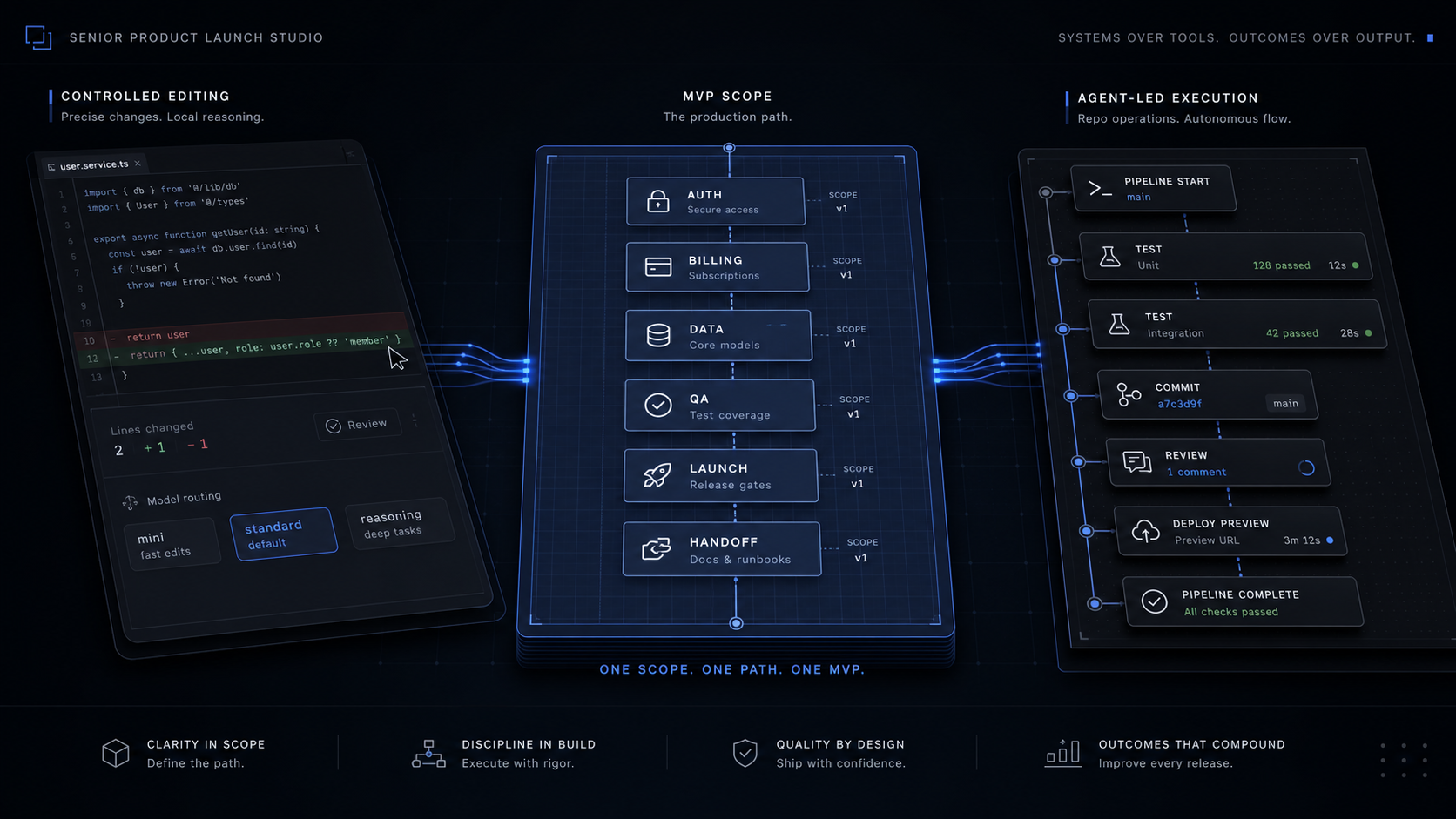
Cursor is the safer first tool when your MVP work is still small, visual, and edit-by-edit. Claude Code is the better fit when the build needs multi-file implementation, terminal loops, tests, and handoff discipline. Neither replaces a scoped production build once auth, payments, data rules, QA, and launch accountability matter.
The Verdict: Cursor for Controlled Editing, Claude Code for Repo-Level Execution
Cursor wins when the technical founder still wants to drive. Claude Code wins when the work is better expressed as a task outcome, tested in the terminal, and reviewed as a finished diff.
That distinction matters more than brand preference. Cursor is strongest as an AI-native editor and agent layer around the way developers already work: files open, diffs visible, autocomplete active, models switchable, and every change easy to inspect. Claude Code is strongest as a coding agent that can move across files, tools, terminal commands, tests, commits, pull requests, and automation surfaces.
For a funded MVP, an MVP is the smallest version that proves one core workflow with real users. The tool choice should follow that workflow.
The clean buyer rule is simple: use Cursor when precision and visual control are the bottleneck. Use Claude Code when execution loops across the repo are the bottleneck. Hire a scoped build team when the bottleneck is product judgment, launch accountability, and production ownership.


The Price Difference Is Not the Sticker Price
Both tools can start at $20 per month, but the real bill is driven by agent intensity, model choice, context size, and how often you let the tool run without a tight task boundary.
Cursor's public pricing page lists Hobby as free, Individual Pro at $20 per month, Teams at $40 per user per month, and Enterprise as custom. Cursor's models and pricing docs add the more important founder detail: individual plans have two usage pools, Auto + Composer and API. Pro is $20 per month with $20 API usage included, Pro Plus is $60 per month with $70 API usage included, and Ultra is $200 per month with $400 API usage included. Cursor says daily Tab users always stay within $20, limited Agent users often stay within the included $20, daily Agent users typically see $60 to $100 per month total usage, and power users with multiple agents or automation often see $200+ per month total usage.
Claude's pricing page lists Free at $0, Pro at $20 monthly or $17 per month with the $200 annual plan, and Max from $100 per month. Claude Pro includes Claude Code. Claude Team is for teams of 5 to 150, with Standard seats at $25 monthly or $20 annual per seat, and Premium seats at $125 monthly or $100 annual per seat. Claude Code's cost docs add the usage reality: API usage charges by token consumption, while Pro and Max subscribers have usage included in the subscription. Across enterprise deployments, Anthropic says costs average around $13 per developer per active day and $150 to $250 per developer per month, with 90% of users below $30 per active day.


For a founder, the lesson is not "pick the cheaper logo." The lesson is to budget by task class:
- Use the lowest individual tier for demos, UI copy, simple components, and small bug fixes.
- Expect a higher monthly tier when agents run multi-file changes every day.
- Put team usage behind shared rules before every developer starts running long sessions on large context.
- Treat automation, subagents, background sessions, and large context as production spend, not a free productivity bonus.
If you want the broader category budget before comparing individual tools, the AI coding assistant pricing guide is the better companion read.
Choose Cursor When the MVP Is Still Editor-Led
Cursor is the better default when you still need tight control over what changes and why. A founder who is technical enough to review diffs but not staffed enough to run a full product team gets the most value from Cursor during prototype and polish work.
Use Cursor for a first dashboard, onboarding flow, landing-to-app handoff, admin panel, or pricing-page experiment where the work is visible and incremental. The editor gives you a familiar file tree, direct edits, tab completions, inline review, and model choice. Cursor's docs also make the cost structure explicit: when you select a specific model or Premium routing, usage is drawn from the API pool at that model's API rate, while Auto and Composer use the separate pool.
Here is the practical Cursor scope for a funded MVP:
Keep the task visual
Ask Cursor for one UI state at a time: empty state, success state, billing error, invited-user state, or mobile breakpoint. Review each diff before moving on.
Bind the edit to acceptance criteria
Write the expected behavior in plain language before prompting: "a user can invite one teammate, the invite is pending until accepted, and resend is disabled for 60 seconds." The tool is faster when the target is narrow.
Use model choice deliberately
Use cheaper or faster routing for routine UI edits. Use premium models for ambiguous architecture, migration, or security-sensitive changes where a wrong answer costs more than the request.
Stop before production ownership gets fuzzy
If the next prompt is about auth policy, billing edge cases, data deletion, tenant isolation, audit logging, or launch analytics, the problem is no longer just editor speed.
Cursor is not weak because it asks you to stay in the loop. That is the point. If the product still needs founder judgment every few lines, Cursor's control surface is an advantage.
Choose Claude Code When the Work Is Repo-Led
Claude Code is the better fit when the task is easier to describe as an outcome than as a set of line edits. Its own docs describe it as an AI-powered coding assistant that can build features, fix bugs, automate development tasks, understand the codebase, and work across multiple files and tools.
That maps well to the messy middle of an MVP. The prototype exists. The demo worked. Now the code needs tests, refactors, dependency cleanup, commit hygiene, environment fixes, API route consistency, and handoff notes. Claude Code can work in the terminal, VS Code, Desktop app, Web, and JetBrains, and its docs describe workflows for writing tests, fixing lint errors, resolving merge conflicts, updating dependencies, writing release notes, creating commits and pull requests, using MCP, storing project context in CLAUDE.md, and running routines.
For a funded SaaS MVP, Claude Code is strongest in these jobs:
- Turn a messy prototype feature into a tested workflow across frontend, backend, and database code.
- Add tests where the acceptance criteria are clear but the file touchpoints are spread across the repo.
- Trace a bug from symptom to root cause, then run the test loop until the patch holds.
- Prepare a handoff branch with commits, release notes, and known follow-up tasks.
- Run repeatable checks through MCP, hooks, skills, or CI integrations when the team already knows the rules.
The risk is scope drift. A terminal agent that can change many files quickly can also create many files quickly. Claude Code's own cost docs are explicit that token usage scales with context size, active agents, and run time. Agent teams spawn multiple Claude Code instances, each with its own context window, and usage scales with active teammates and how long they run.
The operating rule is to treat Claude Code like a junior implementation loop with senior speed, not like the product owner. Give it a task boundary, a branch, a test command, and a definition of done. Review the resulting diff as a product decision, not just a syntax change.
Use Both Only If You Write the Operating Rules First
The strongest founder workflow is often Cursor for controlled editing and Claude Code for repo-level tasks, but only if the rules are written before the tools start working.
Without rules, using both tools doubles the places where context can drift. Cursor may create a careful UI change while Claude Code refactors the surrounding data model. Claude Code may add tests against one behavior while Cursor changes the component state names. The product still needs one source of truth.
Before mixing tools, write this in the repo:
A simple example: a founder building a B2B scheduling MVP can use Cursor to polish the calendar UI, then use Claude Code to add backend tests around availability, invite emails, and cancellation logic. The shared rule is not "make scheduling better." The shared rule is "a team admin can create a booking link, a guest can reserve one available slot, both receive confirmation, and cancellation releases the slot." That is the product boundary.
If you are still comparing the wider class of AI app builders, keep that separate from this decision. Cursor and Claude Code are developer tools. Lovable, Bolt, Replit, and similar platforms solve a different early-build question, covered in the funded MVP platform comparison.
The Handoff Line: When to Stop Tool-Shopping and Scope the Build
Stop choosing between Cursor and Claude Code when the core risk is no longer code generation. A real MVP has to survive users, support, analytics, investor review, and the first set of uncomfortable edge cases.
That line usually appears when the product needs several of these at once:
- Real authentication, roles, and tenant boundaries.
- Payments, plan changes, invoices, refunds, or entitlement logic.
- Data deletion, audit history, export, or privacy review.
- A launch site that explains the offer and converts qualified buyers.
- QA coverage for the one core workflow.
- Deployment, rollback, monitoring, and ownership documentation.
- A clean handoff so the founder, investor, or future engineering hire knows what was built and why.
Cursor and Claude Code can help produce the code. They do not decide what belongs in v1, what gets cut, what the buyer must see before signing up, or what acceptance criteria protect the launch. That is scope work.
The right production move is not to ban AI tools. The right move is to place them inside a fixed scope:
Name the one workflow
Write the single action the user must complete for the MVP to matter. If there are three core workflows, pick one and park the rest.
Mark the non-negotiables
Auth, billing, data rules, analytics, deploys, and handoff do not belong in "later" if real users will touch the product.
Cut the impressive extras
Dashboards, admin powers, AI side features, and onboarding branches are easy to generate and hard to maintain. Cut anything that does not prove the workflow.
Use tools inside the build plan
Let Cursor and Claude Code accelerate implementation, but keep final ownership with the scoped build, test plan, and handoff.
That is the difference between a fast prototype and a fundable MVP. The prototype proves that something can exist. The scoped build proves that the right thing can launch, be used, and be owned.
Is Cursor AI powered by Claude?
Cursor can use Anthropic models through its API pool, but Cursor is not a Claude-only product. Cursor's pricing docs list model access across multiple providers, including Anthropic, OpenAI, Google, xAI, and Cursor's own models.
Is Claude Code or Cursor cheaper?
The entry prices overlap, so the cheaper tool depends on usage. Cursor Pro is $20 per month with $20 API usage included, while Claude Pro is $20 monthly or $17 annual and includes Claude Code; real cost changes with model choice, context, agent time, and team controls.
Can Claude replace Cursor?
Claude Code can replace Cursor for terminal-first repo work, refactors, test loops, commits, and automation. Cursor remains stronger when the builder wants a familiar editor, visual diffs, tab completions, and direct control over each change.
Is Cursor better or Claude?
Cursor is better for controlled editing. Claude Code is better for agent-led implementation across files, tools, and tests. For a funded MVP, the best answer is often Cursor for precise prototype work, Claude Code for repo hardening, and a scoped build team for production ownership.
Book the Scoping Sprint
Turn the prototype, tool choice, and launch risks into a fixed-scope MVP plan your team can build and own.
Jul 4, 2026