Microsoft Copilot Studio Pricing: What Teams Should Budget Before They Build
A practical Copilot Studio pricing review: $30 seats, $200 credit packs, $0.01 PAYG credits, feature rates, Power Platform costs, and build-vs-buy rules.

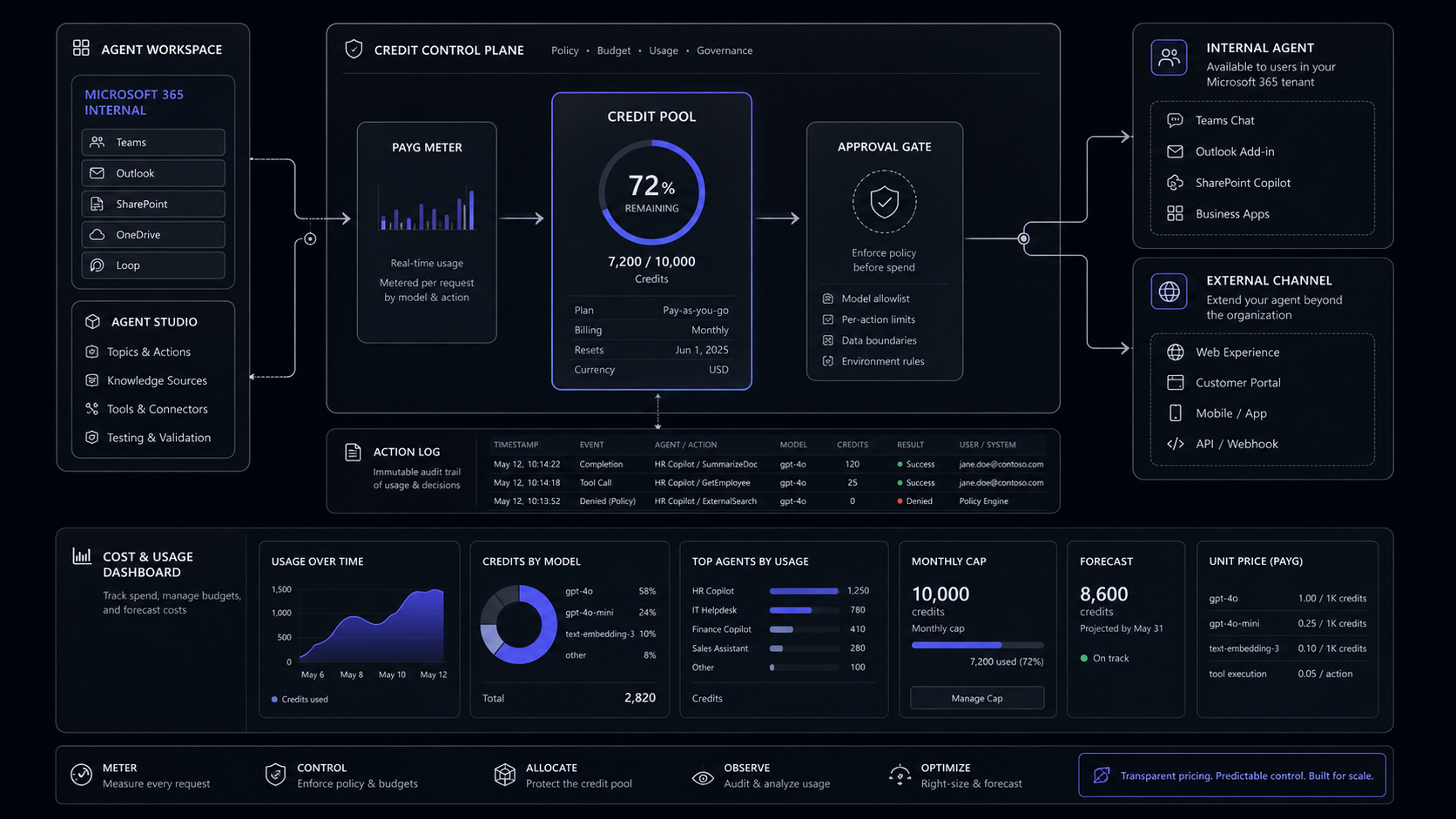
Copilot Studio is cheap only when the agent stays inside Microsoft 365, serves licensed employees, and avoids expensive credit paths. The moment you publish to external channels, add tenant graph grounding, use agent actions, or attach Power Platform work, the budget stops being a seat price and becomes a credit model.
The Short Verdict
Use Copilot Studio when your agent belongs inside the Microsoft stack, and model the credits before anyone builds. The product is strongest for internal Microsoft 365 workflows, Teams and SharePoint surfaces, Power Platform governance, and teams that already pay for Microsoft 365 Copilot. It is weaker as a default choice for every public chatbot, customer workflow, or custom product experience because the real cost follows the agent architecture, not the number of seats.

The clean decision rule is this: if licensed employees will use an internal agent in Microsoft 365 Copilot, Teams, or SharePoint, start with Copilot Studio. If external users, non-Microsoft channels, custom UX, non-Microsoft data control, or predictable high-volume traffic drive the use case, price Copilot Studio against a custom AI feature before you commit.
The buyer mistake is asking "how much is Copilot Studio per user?" That is the wrong unit. Microsoft 365 Copilot is priced per user. Standalone Copilot Studio is priced by Copilot Credits, a usage unit that measures the work an agent performs. A scripted answer, a grounded generative answer, an action call, a reasoning-model prompt, and a voice minute do not cost the same.
That makes Copilot Studio a good platform, not a magic budget. Before the first agent goes live, you need a credit model, an environment cap, logs for every action, and a human handoff for the steps that should not run without review. The broader AI agent pricing model is still the right frame: seats, credits, resolutions, minutes, and build cost all need a common budget view.
What Copilot Studio Costs In 2026
Copilot Studio has three useful pricing paths: included internal use through Microsoft 365 Copilot, prepaid standalone credits, and Azure pay-as-you-go. Each path is valid, but each fits a different buyer.
Microsoft says Copilot Studio access is included for licensed Microsoft 365 Copilot users, at $30.00 user/month, paid yearly, for building and using internal agents. The important phrase is internal. Microsoft 365 Copilot licensed users can use agent capabilities in Microsoft 365 Copilot, Teams, or SharePoint, and classic answers, generative answers, and Microsoft Graph tenant grounding in those surfaces are zero-rated against the Copilot Studio pack or meter.
Standalone Copilot Studio is different. Microsoft lists Copilot Studio as a tenant-wide license with Copilot Credit capacity packs of 25,000 Copilot Credits each, priced at $200.00 per pack per month. Azure pay-as-you-go pricing lists Copilot Credits at $0.01 each. Microsoft also offers a pre-purchase plan with Copilot Credit Commit Units, where up-front purchase can save up to 20% and automatic pay-as-you-go coverage can take over when prepaid credits run out.

The September 1, 2025 change matters for anyone reading older pricing material. Microsoft Learn says the common currency for agents changed from messages to Copilot Credits, with no change in prepaid-pack quantity or pay-as-you-go rate. If a budget spreadsheet still says "messages," update it. The billable question is now "which feature rates does this agent trigger?"
Classify the agent before pricing
Mark the agent as internal employee-facing, external customer-facing, or mixed. Internal employee-facing agents used by Microsoft 365 Copilot licensed users may be zero-rated in Microsoft 365 surfaces. External agents need standalone credits.
Choose the billing rail
Use Microsoft 365 Copilot inclusion for licensed internal use, pay-as-you-go for testing or variable volume, and prepaid packs only once the expected monthly credit burn is known.
Attach a monthly cap
Set a monthly consumption limit for each agent in the Power Platform admin center before launch. This keeps a test agent, a public widget, or a mis-scoped flow from draining a shared tenant pool.
The Credit Rates That Decide The Real Bill
The same conversation can cost 1 credit or dozens of credits, because Copilot Studio bills by feature use. A classic answer is a predefined response. A generative answer is a model-written answer. Tenant graph grounding, agent actions, agent flows, AI tools, content processing, and voice each add their own rate.
The rate table changes how you should scope the first build. A policy answer that returns a controlled response can stay at 1 credit. A generative answer is 2 credits. A generative answer with tenant graph grounding can be 12 credits because Microsoft gives the example of 10 Copilot Credits for tenant graph grounding plus 2 Copilot Credits for the generative answer. A workflow that adds action calls climbs again.
That is why a "simple HR agent" is not simple until you know the answer path. If it only routes employees to static policy pages, the budget is small. If it grounds every answer in Microsoft Graph, drafts a response, calls a flow, and escalates edge cases, the credit profile changes.
The high-risk items are easy to name. Tenant graph grounding is powerful but adds 10 credits when used. Agent actions cost 5 credits each. Premium text and generative AI tools cost 100 Copilot Credits per 10 responses, or 10 Copilot Credits per 1,000 tokens. Voice can be 10, 35, or 75 credits per minute depending on tier.
The controlled build pattern is to separate answer types before launch:
- Static answer: known policy, status, or process instruction. Use classic answers where the response should not vary.
- Generative answer: natural-language answer from controlled knowledge. Log the source and response.
- Grounded answer: Microsoft Graph or tenant data answer. Use only where the user's identity and tenant context are actually needed.
- Action answer: the agent changes something, creates a ticket, updates a record, sends an email, or starts a flow. Add approval or human review for high-impact steps.
- Voice answer: price by minute and route edge cases quickly, because voice tiers burn credits faster than text.
A Worked Budget For Three Agents
The useful budget is a path model, not a licensing table. Here are three reference scenarios using Microsoft rates and pay-as-you-go math. Treat them as planning examples, not promised Microsoft quotes.
The internal policy bot is the easiest win if the users already have Microsoft 365 Copilot licenses. Microsoft Learn says employee-facing usage scenarios by Microsoft 365 Copilot licensed users can be included when agents operate in Microsoft 365 Copilot, Teams, or SharePoint under the licensed user's identity, subject to fair usage. The same bot becomes a standalone credit cost if it serves unlicensed users or moves outside those included surfaces.
The external support triage agent needs a stricter test. At 45,000 credits, pay-as-you-go would be $450. A $200 pack covers 25,000 credits, so one pack is not enough. Two packs would cover 50,000 credits for $400 if the usage is predictable. If traffic swings, pay-as-you-go may be safer while the team learns the real volume.
The triggered order helper is where buyers often undercount. Microsoft's order-processing example uses four action calls and estimates 20 Copilot Credits per triggered run. At 3,000 triggered runs, that is 60,000 credits before any extra grounding, document processing, or exception review. The right question is not whether Copilot Studio can run it. The question is whether Power Platform should own the process, or whether the order workflow belongs in the product database with a custom AI layer and explicit audit logs.
Write the path
For one representative interaction, list each step the agent takes: answer, grounding, action, flow, document page, voice minute, or handoff.
Multiply by monthly volume
Use expected monthly interactions, not best-case demo usage. Split employee, customer, and triggered-system traffic because their billing paths differ.
Price both rails
Calculate pay-as-you-go at $0.01 per credit, then compare prepaid packs at $200.00 for 25,000 credits. Use packs for stable base load and pay-as-you-go for overflow.
Decide the control point
If the agent changes records, sends messages, creates orders, or touches customer data, budget for logs, approvals, and owner review. The cost of a bad action is not only the credit.
What The Sticker Price Leaves Out
The Copilot Studio bill is not always the whole system cost. The real budget can also include Microsoft 365 base licensing, Power Platform licensing, Dataverse storage, Power Automate automation, Azure billing setup, and implementation work.
Power Platform costs matter when the agent becomes part of an operational workflow. Microsoft lists Power Apps Premium at $20.00 user/month, paid yearly, with prebuilt, custom, and on-premises connectors plus Dataverse entitlements of 250 MB database and 2 GB file. The Dataverse Database Capacity add-on is $40.00 per GB/month, paid yearly. Power Automate Premium is $15.00 user/month, paid yearly. Power Automate Process is $150.00 bot/month, paid yearly. Power Automate Hosted Process is $215.00 bot/month, paid yearly. Power Automate Process Mining is $5,000.00 tenant/month, paid yearly.
Those line items do not apply to every Copilot Studio build. They do apply when the agent sits on top of apps, premium connectors, Dataverse-heavy records, unattended automations, or process-mining work. A team that prices only the $200 pack can still miss the surrounding platform bill.
There is also an availability risk. Microsoft Learn says unused Copilot Credits do not carry over, prepaid capacity is enforced monthly, and service denial can occur when usage exceeds purchased capacity. Enforcement is triggered when a tenant reaches 125% of prepaid capacity. Custom agents are disabled after the current conversation if capacity is not increased or pay-as-you-go is not enabled. Agent flow enforcement is narrower: new agent flow runs are blocked when prepaid capacity is consumed, while the parent agent can remain available for non-flow interactions.
For a customer-facing agent, that is not just budget hygiene. It is uptime planning. Pay-as-you-go can be the difference between a controlled overage and a blocked workflow. A monthly agent cap can be the difference between a noisy test and a tenant-wide credit drain.
When To Use Copilot Studio And When To Build Custom
Copilot Studio is the right first choice when Microsoft identity, Microsoft Graph, Teams, SharePoint, Power Platform governance, and Microsoft admin controls are the center of the workflow. It lets a Microsoft-first team build agents without inventing a new control plane.
Use Copilot Studio when:
- The users are employees who already have Microsoft 365 Copilot licenses.
- The agent lives in Teams, SharePoint, Microsoft 365 Copilot Chat, or a Microsoft-native workflow.
- Power Platform connectors and admin controls are already standard inside the company.
- The first release can tolerate Copilot Studio's interaction model and billing model.
- The team wants maker-friendly iteration before committing to a custom product surface.
Build a custom AI feature when:
- The agent is part of your product experience, not just an internal Microsoft workflow.
- External users, public website traffic, or customer support channels create high or spiky usage.
- The workflow needs custom UI, product telemetry, domain-specific permission logic, or non-Microsoft data architecture.
- Model choice, token-level cost control, retrieval design, or evaluation test sets matter.
- You need one fixed workflow with logs, approvals, handoff, and ownership more than a general platform.
The cost comparison should include implementation, not only license spend. A custom AI feature has build cost and maintenance cost. Copilot Studio has platform licensing, credit consumption, Power Platform dependencies, and implementation work. The better option is the one whose control model fits the workflow. For automation-heavy use cases, the same logic applies as Zapier task math: a tool is cheap while volume and logic are simple, and expensive when the workflow becomes a system.
- Strong fit for Microsoft 365, Teams, SharePoint, Graph, and Power Platform environments.
- Clear pay-as-you-go unit at $0.01 per Copilot Credit.
- Prepaid packs give predictable base capacity at $200.00 for 25,000 credits.
- Microsoft 365 Copilot licensed users can get zero-rated internal usage in supported Microsoft surfaces.
- Admins can monitor usage and set monthly agent consumption limits.
- Credit burn depends on architecture, so early demo cost can understate production cost.
- External and customer-facing channels move the build into standalone credit budgeting.
- Tenant graph grounding, actions, reasoning tools, content processing, and voice can raise cost quickly.
- Prepaid capacity does not roll over and enforcement can disable agents after overage thresholds.
- Power Platform, Dataverse, Power Automate, and Azure dependencies may add separate budget lines.
The Pre-Build Checklist
Scope Copilot Studio like a controlled business system before a maker builds the first version. A clean first release has one workflow, one owner, one billing rail, one escalation path, and one monthly usage cap.
Use this checklist before launch:
- Channel: Microsoft 365 internal, Teams, SharePoint, website, app, social channel, voice, or mixed.
- User class: Microsoft 365 Copilot licensed employees, unlicensed employees, customers, partners, or anonymous users.
- Billing rail: Microsoft 365 Copilot inclusion, prepaid packs, pay-as-you-go, or pre-purchase commit.
- Credit path: classic answers, generative answers, tenant graph grounding, agent actions, agent flows, AI tools, content pages, voice minutes.
- Monthly cap: named limit per agent in Power Platform admin center.
- Overflow rule: pay-as-you-go enabled, extra pack purchase, graceful fallback, or service denial accepted.
- Data boundary: Microsoft Graph, Dataverse, SharePoint, CRM, product database, support system, or custom API.
- Control boundary: logs, approvals, role checks, handoff trigger, owner, and exception queue.
- Success metric: cost per resolved task, time saved, ticket deflection, cycle-time reduction, or fewer manual handoffs.
The best first Copilot Studio build is not the broadest agent. It is a bounded workflow where the credit path is known, the system logs every important step, and humans keep authority over expensive or high-impact actions.
What is the difference between Copilot and Copilot Studio license?
Microsoft 365 Copilot is a per-user assistant license. Copilot Studio is the agent-building platform: internal use can be included for Microsoft 365 Copilot licensed users in supported Microsoft surfaces, while standalone agents use prepaid or pay-as-you-go Copilot Credits.
Do you have to pay for Microsoft Copilot Studio?
Yes, unless the use case fits included Microsoft 365 Copilot internal usage or a trial. Standalone Copilot Studio uses $200.00 packs for 25,000 Copilot Credits or pay-as-you-go at $0.01 per Copilot Credit.
Can I use Copilot Studio for free?
You can try Copilot Studio, and Microsoft Learn says a trial license lets an individual create agents and test them in the test chat panel. The trial does not let you publish the agent.
Is Copilot Studio included in Microsoft 365?
Copilot Studio access is included with Microsoft 365 Copilot for licensed users building and using internal agents. It is not the same as standalone external-channel Copilot Studio usage, which needs prepaid credits or pay-as-you-go billing.
What is the cheapest way to start with Copilot Studio?
For internal employee workflows, start inside Microsoft 365 Copilot if your users are already licensed. For standalone agents, start with pay-as-you-go and a strict monthly cap, then move predictable base volume to $200.00 credit packs after usage is measured.
Audit Your AI Stack
Get a fixed-scope review of your AI and SaaS spend, usage paths, build-vs-buy choices, and the tools that should stay, go, or become controlled systems.
Jun 15, 2026