Microsoft 365 Copilot vs Copilot Studio: Use, Extend, or Build?
A buyer-grade comparison of Microsoft 365 Copilot and Copilot Studio: when to use internal agents, pay for credits, or build custom.

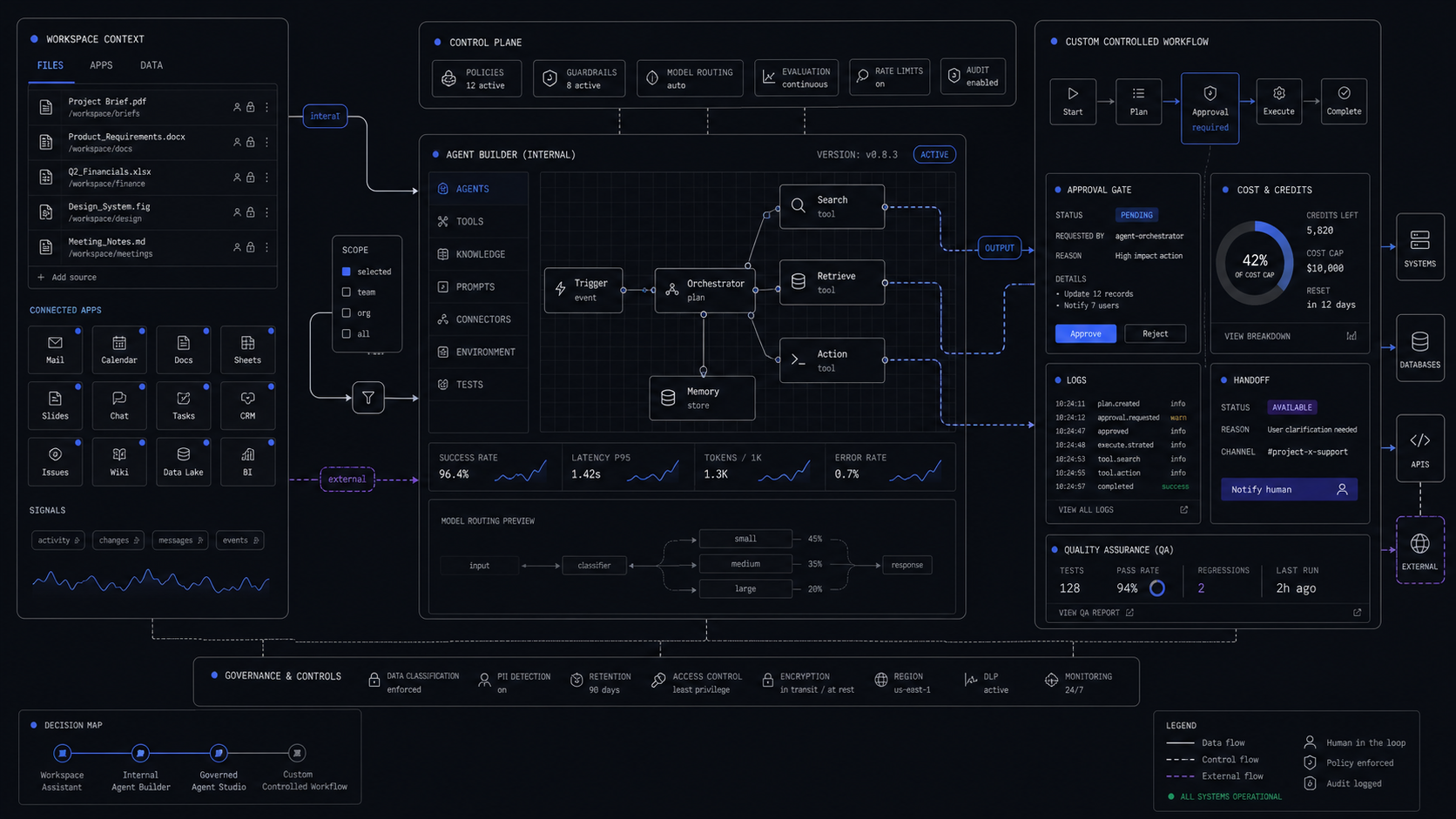
Use Microsoft 365 Copilot when the work lives inside Microsoft 365 and the agent is for one person or a small internal team. Use Copilot Studio when the agent must touch business systems, run a governed workflow, publish beyond Microsoft 365, or justify its usage cost.
The Short Verdict
The right choice is not "Copilot or Copilot Studio." The right choice is the smallest controlled layer that can finish the workflow without creating a licensing mess.
Microsoft 365 Copilot is the better starting point when the job is personal productivity, Microsoft 365 knowledge retrieval, drafting, meeting work, spreadsheet analysis, or a lightweight internal agent grounded in files a user already has permission to see. It is the assistant and Agent Builder surface inside Microsoft 365.
Copilot Studio is the right layer when the agent needs a wider audience, a workflow with branches and approvals, premium or custom connectors, external publishing, lifecycle management, or usage reporting that finance and IT can govern. Microsoft describes Copilot Studio as the fuller build and management environment for agents that need business system integration, deployment control, and enterprise governance.
The third option is a custom system. That wins when the value is not the chat surface, but the operating workflow around it: a specific intake form, deterministic routing, approval screens, audit logs, quality checks, and handoff into systems your team already runs. In those cases, Copilot can still sit beside the workflow, but it should not own the workflow.
The Buyer Comparison
Choose by audience, system boundary, and cost meter. A vague "we need an agent" scope will push you into the wrong product because all three options can sound plausible in a demo.

The decision flips when the agent stops answering and starts doing. A SharePoint policy assistant for ten employees belongs in Microsoft 365 Copilot. A support triage agent that reads an account plan, checks entitlement, creates a ticket, escalates high-risk issues, and reports usage by department belongs in Copilot Studio or a custom system.
The clean test is this: if the agent can fail without creating an operational liability, keep it close to Microsoft 365. If the failure creates a missed SLA, a billing issue, a customer-facing mistake, or a compliance question, scope the control layer before you buy more licenses.
The Cost Split That Usually Decides It
Microsoft's current Copilot Studio pricing page lists Microsoft 365 Copilot at $30.00 per user/month, paid yearly for the agent-building comparison. That license includes Copilot Studio access for licensed users, lets them build internal agents that work within Microsoft 365, and says internal workflow agents can be built and accessed without usage limits.
The important boundary is "internal." Microsoft's pricing page says the standalone Copilot Studio plan is the path when you need to publish or share agents to outside channels. The FAQ says Copilot Studio included with Microsoft 365 Copilot lets licensed users build and use internal agents at no additional cost, while standalone Copilot Studio adds external channels, non-licensed users, and different pricing options.
Standalone Copilot Studio is a credit product. Microsoft's FAQ says it is sold as a tenant-wide license with Copilot Credit capacity packs of 25,000 Copilot Credits priced at $200.00 per pack/month. Microsoft also offers pay-as-you-go billing, which requires no upfront license commitment and bills for consumed Copilot Credit capacity at the end of the billing period. The same pricing page says an Azure subscription is required to use agents.

That creates a practical budget rule:
- If the agent is internal and every user already has Microsoft 365 Copilot, start there and measure adoption before buying standalone capacity.
- If the agent serves non-licensed users, public users, customers, partners, or external channels, budget Copilot Studio credits from day one.
- If the agent runs a high-volume or high-stakes process, model the cost per completed workflow, not the cost per chat.
- If usage is uncertain, pay-as-you-go is useful for discovery, but it still needs monthly thresholds, alerting, and a shutdown rule.
For deeper credit math, see our existing guide on Microsoft Copilot Studio pricing and budget controls.
When Microsoft 365 Copilot Is Enough
Microsoft 365 Copilot is enough when the workflow is mostly inside Microsoft 365 and the output is assistive, not operationally final. It is strongest when it helps a person move faster inside the tools they already use.
Good fits include:
- A project FAQ agent that answers from internal documentation.
- A product documentation assistant for sales or support teams.
- An onboarding agent that helps new hires find HR and team information.
- Meeting summary, email drafting, document synthesis, and presentation prep.
- Department knowledge Q&A where existing SharePoint, Teams, and Outlook permissions are the control boundary.
Microsoft's Agent Builder guidance is clear on the reason: Agent Builder is for yourself or a small team, uses natural language and existing content, and stays integrated with the Microsoft 365 Copilot experience. Its governance posture is also useful for narrow internal work. Microsoft says these agents do not create new privileges, and if a user lacks access to a SharePoint site, Teams channel, or mailbox, the agent does not surface that content.
That makes Microsoft 365 Copilot a good first layer for knowledge work. It is not a good owner for workflows that need a state machine, an exception queue, approval thresholds, or a customer-facing promise.
Start with a permission-safe internal agent
Pick one knowledge base: a sales handbook, project folder, onboarding library, or support policy set. Give the agent a narrow job and test whether it answers from approved content only.
Measure two weeks of real use
Track who used it, which questions it handled, which answers needed correction, and which requests should become workflow actions instead of answers.
Promote only the repeated workflow
If people keep asking the agent to "create," "route," "approve," "check," or "notify," do not keep stretching a Q&A agent. That repeated action is the candidate for Copilot Studio or a custom system.
When Copilot Studio Is The Right Layer
Copilot Studio is the right layer when the agent needs to leave the personal productivity lane and behave like a managed business application. The signal is not sophistication. The signal is responsibility.
Use Copilot Studio when the agent needs any of these:
- A department, organization, customer, partner, or external audience.
- Publishing to Teams, websites, apps, or social platforms.
- Multi-step logic, branches, approvals, or handoff.
- Business system integration through prebuilt, premium, or custom connectors.
- A connection to data beyond Microsoft 365.
- Separate development, test, and production environments.
- Role-based access, DLP policies, audit, telemetry, and usage analytics.
- Power Platform governance and admin oversight.
Microsoft's comparison table puts this plainly. Agent Builder is for lightweight Q&A agents with organizational knowledge. Copilot Studio is for complex scenarios like multi-step workflows or business system integration that require governance and robust controls.
Here is a practical support example. A support lead asks for "a Copilot agent that answers refund questions." If the agent only helps internal reps find policy language, start in Microsoft 365 Copilot. If it checks customer status, confirms order history, applies refund limits, drafts a ticket note, and routes exceptions to a human, Copilot Studio is the minimum Microsoft layer because connectors, branching, and governance matter.
When To Build A Custom System Instead
Build custom when the workflow needs a product surface, deterministic control, or economics that Microsoft licensing does not fit. Copilot Studio can be a strong builder layer, but it is still part of a platform. Some workflows need a purpose-built operating surface.
Custom is worth scoping when:
- The user experience is a form, table, queue, dashboard, review screen, or customer portal rather than a chat.
- The workflow needs exact status tracking such as
new,needs_review,approved,sent,failed, andescalated. - The system must write to several non-Microsoft systems with strict validation.
- Finance needs cost per workflow outcome, not a credit bill that is hard to tie to value.
- Quality needs test sets, regression checks, sampled review, and alerting before launch.
- The business wants one fixed-scope build instead of a platform rollout.
A common example is lead qualification. Microsoft 365 Copilot can help a sales manager draft account notes. Copilot Studio can expose an agent that checks CRM data and asks follow-up questions. A custom system is better when the company needs a repeatable intake form, enrichment, scoring, routing rules, rep assignment, approval logging, and a weekly conversion dashboard. The value is the controlled workflow, not the assistant.
This is also where hype breaks. A buyer does not need a vague agent program. They need a bounded system that says what it will read, what it may write, when it asks a human, what it logs, and how success is measured. If that description is hard to fit inside Copilot Studio's agent model, build the smaller custom workflow and connect Microsoft tools only where they help.
A Practical Scope Checklist
Scope the choice before buying the next license or building the next agent. Use these five questions.
The build plan should name the control points:
- Inputs: which documents, tables, apps, and APIs the system can read.
- Actions: which fields or systems it can write to, and under what threshold.
- Review: which actions require approval before send, submit, refund, update, or close.
- Logs: what gets stored for debugging, billing, QA, and compliance.
- Fallback: who receives exceptions, and what the user sees when the agent cannot proceed.
- Cost guardrails: budget cap, usage alert, shutoff rule, and owner.
If those six lines are not clear, the team is not choosing a product yet. It is still discovering the workflow.
FAQ
Is Copilot Studio included with Copilot?
Copilot Studio access is included for licensed Microsoft 365 Copilot users for internal agents in Microsoft 365. Standalone Copilot Studio is the paid path when agents need external channels, non-licensed users, credit packs, or pay-as-you-go usage.
What is the difference between Copilot builder and Copilot Studio?
Agent Builder inside Microsoft 365 Copilot is for simple agents created in context for individuals or small teams. Copilot Studio is the fuller build environment for agents that need integrations, workflows, broader deployment, environments, and governance.
Is Copilot Studio free or paid?
It depends on the use case. Internal Copilot Studio access is included with Microsoft 365 Copilot licenses for licensed users. Standalone Copilot Studio is paid through prepaid Copilot Credit packs or pay-as-you-go, and Microsoft's FAQ lists 25,000-credit packs at $200.00 per pack/month.
What is the difference between Copilot Studio and normal Copilot?
Copilot is the assistant experience for work inside Microsoft 365, including chat and app experiences in tools such as Teams, Outlook, Word, PowerPoint, and Excel. Copilot Studio is the platform for creating, customizing, deploying, and managing agents.
Should we use Copilot Studio or build custom?
Use Copilot Studio when Microsoft 365, Power Platform, connectors, and agent governance cover the workflow. Build custom when the job needs a dedicated product surface, strict workflow states, non-Microsoft data contracts, QA gates, or cost tracking by completed outcome.
Audit Your AI Stack
Map Copilot, Copilot Studio, custom agents, and SaaS tools into a controlled build plan.
Jun 20, 2026